Learn how Viam works: from modules, models, and fragments to application deployment and version control. After reading, you’ll understand how robotic systems are built on Viam, and how you can build them while relying on the software development principles you already know. This is a great place to start if you already know what Viam is and want to better understand the process of building a robot on the platform. If you’re ready to get started, visit the Viam Docs.
If you've ever worked with hardware, you know the friction: hunting for drivers, debugging network configs, building data pipelines from scratch, and manually deploying to each device. Viam eliminates that friction by handling infrastructure so you can focus on application logic.
Viam's development workflow mirrors the software development process you already know: configure your components, write application code against well-defined APIs, deploy with version control. Here's how.
Configure hardware with JSON and modules
Traditional hardware integration means writing device drivers, managing dependencies, and dealing with vendor-specific APIs. With Viam, you configure once and the platform handles the rest.
You can get started by adding a camera, motor, arm, or sensor to your JSON config with a few parameters: model, connection type, and any device-specific settings. viam-server handles the rest—pulls the driver, initializes the device, and exposes it through a consistent API. You don't have to write device drivers or worry about dependencies.
All cameras expose the same interface regardless of manufacturer. Same for motors, sensors, arms, and other component types. Your code doesn't change when hardware does. You can replace an Intel RealSense with an Orbbec Astra camera, or swap one motor controller for another—update the config and your application keeps working.
The Viam Registry includes drivers for hundreds of devices; if yours isn't supported, write a module once and reuse it everywhere.
But the Registry is more than a driver library—it's the foundation for building complete robotics applications.
The Viam Registry: modules, models, and fragments
The Viam Registry is a central repository of modules, ML models, training scripts, and configuration fragments that you can trust and reuse. It’s contributed to by engineers within Viam and the broader robotics community.
You can find modules for your hardware, ML models for common tasks, or fragments for common setups, or publish your own assets publicly or privately within your organization. All registry assets support semantic versioning, so you can pin to stable versions or allow automatic updates.
The Viam Registry is made up of three core building blocks that unlock fast, iterative robotics development:
Modules provide drivers for cameras, motors, sensors, arms, and other hardware, plus services like machine learning (ML)-based object detection. viam-server also includes built-in services for motion planning, navigation, and data management. These are available without additional configuration.
ML models in the Registry include pretrained models for common tasks. The ML model service runs inference on models trained within Viam or elsewhere, and supports TensorFlow Lite, ONNX, PyTorch, and other frameworks.
Fragments are reusable configuration blocks. Define a combination of components, services, and modules once, then apply that configuration across any number of machines. Use fragments to configure a camera-arm combination, a camera-to-object-detection pipeline, or an entire work cell. Fragments support variable substitution and per-machine overwrites, so you can deploy the same base configuration to hundreds of machines while accommodating site-specific settings. The Registry includes public fragments for common setups, and you can create private fragments for your organization's hardware configurations.
Remote development and debugging
Traditional robotics development means being physically present or SSH'd into your machine. Viam breaks that constraint.
You can connect to your machine from anywhere—no VPN, no port forwarding, no firewall configuration. Viam handles NAT traversal automatically.
The web app, SDKs, and CLI all use the same connection infrastructure, so you can debug from your laptop and monitor from the Viam web app.
This remote connectivity changes your entire development workflow: you can write scripts on your laptop that connect to a machine over the network to inspect component state, run diagnostics, or test behavior without deploying code. Stream logs remotely through the web app, filtered by level, keyword, or time range.
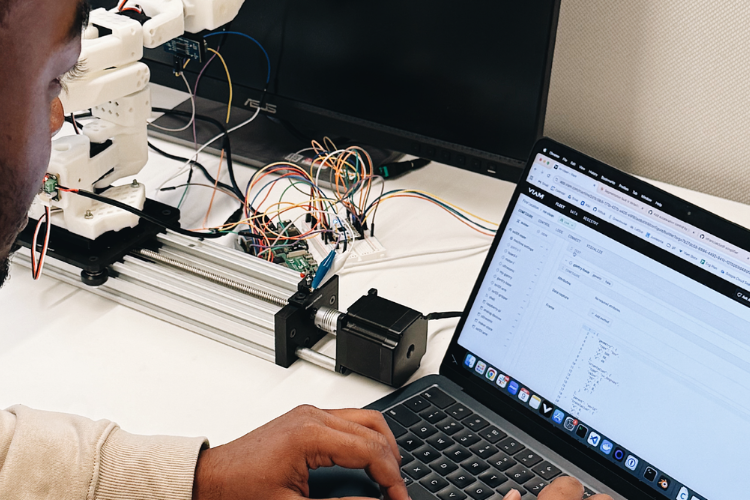
You can also view live camera feeds and sensor readings in the web app's TEST panel for each component. Teleoperate directly from the browser—drive a base with keyboard controls, move an arm to specific positions, or reposition a gantry. See everything in a live 3D view showing component positions, camera feeds, and point clouds that update in real time as components move.
Viam lets you iterate from your IDE: write code on your laptop, then run it against your robot hardware over the network. No copying files, no deploy step. Just run and see results.
For tight control loops where latency matters, run scripts directly on your robot machine—same code, same APIs, just a different execution environment.
When you're ready for production, package your code as a module that viam-server manages: it starts on boot, restarts on failure, and reconfigures when settings change. Motion planning, computer vision, navigation, and data capture are all available as services you call from any SDK.
Remote development solves where you write code. But robotics applications often need to move physical components through space—which introduces its own complexity.
Want to know how Viam solves common problems across the robotics development workflow?
Learn moreConfigure motion planning without manual calibration
Viam includes a motion planning service that moves arms, gantries, and mobile bases while avoiding collisions to take action in the physical world. The motion planner needs to know where each component is in 3D space: their positions, orientations, and physical dimensions.
The Viam Registry includes fragments with pre-computed spatial configurations for common hardware combinations so you don’t have to configure these relationships manually. You can add a fragment for your specific camera, mount, and arm instead of measuring and calculating yourself.
Fragments for common hardware combinations include pre-computed transforms—the spatial relationships needed for coordinated motion—so no manual measurement is required.
You can define static obstacles in your work cell and the motion planner routes around them automatically for obstacle avoidance.
These reusable configurations mean you can create fragments for your custom setups and apply them across machines.
Motion planning lets your robots act in the physical world. To make them smarter over time, you need to capture data from those actions and train models on what they observe.
Data capture and machine learning pipelines
Building ML-powered robotics applications typically means building custom data infrastructure first. Viam includes it.
With Viam you can configure data capture in JSON—which components, how often, what to keep—and Viam will handle the pipeline.
Your data syncs to the cloud when connectivity allows, survives network interruptions and restarts, and queues locally on devices with constrained bandwidth. No custom sync logic, no managing local storage, no worrying about edge cases.
You can capture from any component—record images from cameras, readings from sensors, or custom data from your own modules—all with configuration, no code required.
Data syncs automatically when bandwidth is available; if your machine goes offline, data queues locally and syncs when connectivity returns.
Filter at the edge to reduce bandwidth and storage costs by filtering before sync, keeping only images with detections, sensor readings outside normal ranges, or samples at specified intervals.
Query across your fleet to find data by machine, location, time range, component, or tags, then export for analysis or training. Storage is managed automatically: set retention policies to delete old data and configure local storage limits for edge devices with constrained disk space.
Data capture gets you the raw material. The next step is turning that data into models you can deploy across your fleet.
Train and deploy models without the overhead
Setting up ML training infrastructure—provisioning GPUs, building pipelines, managing model versions—can take weeks before you ever train your first model. Viam eliminates that overhead, letting you train on captured data or import existing models and deploy them with the same mechanisms you use for code.
To train in Viam, select captured data, annotate, choose a model architecture, and start a training job—no GPU provisioning, no training pipeline setup. Viam handles it.
You can also bring your own model by importing models trained in TensorFlow, PyTorch, ONNX, or other frameworks, then upload to the Registry and deploy like any other versioned asset.
Deploy to your fleet by pushing a model to the Registry and configuring machines to pull it, pinning to specific versions or allowing automatic updates—same as modules.
The ML model service runs on the machine itself, so inference happens locally without round-trips to the cloud.
ML models are one piece of your robotics application. Your control logic, custom modules, and application code all need the same deployment and version control capabilities.
Application deployment and version control
You've built your application. Now you need to deploy it, manage versions, and push updates without SSH'ing into individual machines.
In traditional robotics development, this means writing deployment scripts, managing dependencies per device, and often rebuilding for different architectures. Updates require coordination across your fleet, and rollbacks mean manually reverting on each machine.
Viam treats your application code like any other software package—version it, deploy it, and update it through the Registry.
Package your control logic as a module and deploy through the Viam Registry for version control, remote updates, and fleet-wide rollouts. No cross-compiling. Viam handles everything.
viam-server manages the lifecycle of your application: it manages dependencies and ensures your application code starts on boot and restarts when necessary.
You can reconfigure on the fly by tuning the application parameters you define with configuration updates in the Viam app—changes apply within seconds with no restarts or redeployment.
For version control, pin machines to exact versions for stability, or allow automatic updates at the patch, minor, or major level.
Push new versions to the registry with the CLI for OTA updates; machines pull updates automatically per their update policies.
This development workflow—from hardware configuration through application deployment—works identically whether you're building on one machine or managing hundreds.
Next up
This development workflow—configure, build, deploy—works for one machine or one hundred. But production deployments introduce new challenges: maintaining fleets, monitoring at scale, and delivering products to customers.
Want to see how this scales to production? In the next post (Viam for Production), we'll cover fleet management and remote operations.